83% of creators now use AI in some part of their workflow (Wondercraft/Digiday, May 2025). Most guides on YouTube automation assume you'll spend $50-$200 per month on tools to get there. That's the wrong assumption.
You don't need a paid stack to run a real YouTube automation channel. You need the right free tools, a repeatable process, and honest expectations about timelines. That's what this post covers.
We'll walk through the complete system: channel types, tool choices, the July 2025 YouTube AI policy, and a weekly workflow you can actually maintain. If you want the step-by-step video creation process, the how to start a faceless YouTube channel with AI guide covers that in detail.
Key Takeaways
- YouTube automation with AI means using tools to assist human-guided content creation, not replacing human oversight entirely.
- There are 4 distinct automation channel types. Finance and B2B niches earn the highest RPM ($12-$30), per TubeBuddy 2025.
- You can build a complete automation stack for $0 using free tiers of ChatGPT, ElevenLabs, CapCut, and Canva, plus free tools from CreatorsToolHub.
- YouTube's July 2025 policy flags "repetitive, templated, low-effort AI content" for demonetization. Quality and editorial voice still matter.
- Only 3 million of 115 million YouTube channels are monetized (DemandSage, 2026). The bar is achievable, but it takes 6-18 months of consistent posting.
What Is YouTube Automation with AI? (And What It Isn't)
Over 1 million YouTube channels now use AI tools daily (YouTube CEO Neal Mohan's Jan 2026 creator letter, via DemandSage). That number tells you the practice is mainstream. What it doesn't tell you is how wide the gap is between doing it right and doing it in a way that gets your channel flagged.
Semi-automated channels are what this post covers. A human chooses the topic, reviews the script, selects visuals, and makes editorial decisions at each stage. AI tools handle the time-consuming execution: drafting scripts, generating voiceovers, assembling footage. You're the producer. The AI is your production team.
Fully automated channels are a different story. These use bots or automated pipelines to upload content without meaningful human oversight. YouTube's terms of service treat this as a violation. Channels running fully automated pipelines risk demonetization and termination. Don't confuse the two.
The distinction matters for one practical reason: monetization. YouTube's review process checks for human editorial input. Semi-automated channels can qualify for the YouTube Partner Program. Fully automated ones almost never survive long enough to try.
For the detailed video-by-video creation process, the how to start a faceless YouTube channel with AI guide covers that in detail.
The 4 Types of YouTube Automation Channels
Not all automation channels are the same. Most beginners think "faceless YouTube" means one thing: an AI voice reading a script over stock footage. In practice, there are four distinct channel types, and they differ significantly in RPM, difficulty, and the tools they need.
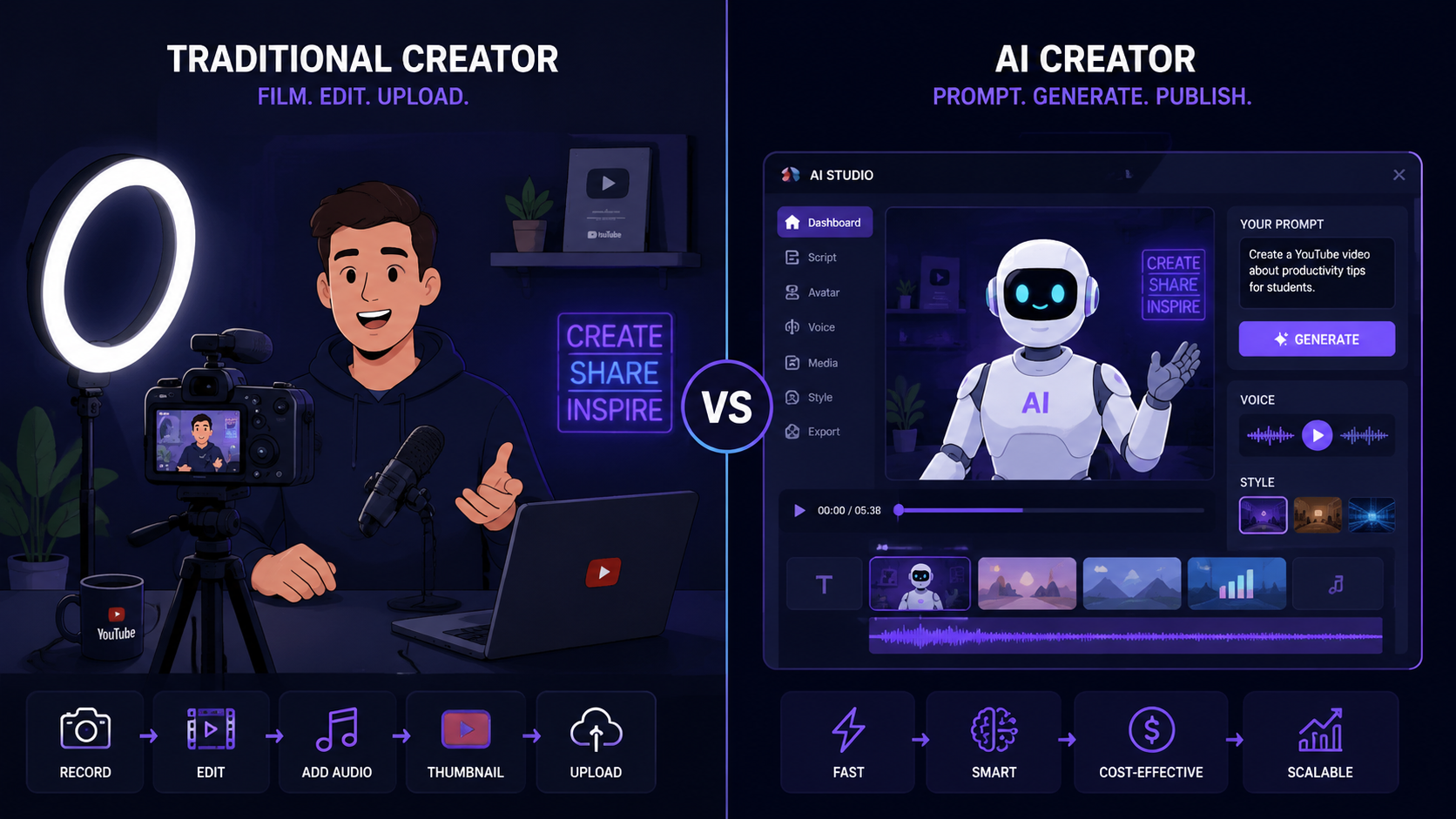
1. AI Narration Channels
AI narration channels pair a generated voiceover with stock video or AI-generated visuals. Common niches include history, finance, personal development, and "Top 10" formats.
- RPM range: $4-$25 depending on niche (finance at the high end, general interest at the low end)
- Difficulty: Low to medium. The format is well-established and easy to replicate.
- Best free tool: ElevenLabs free tier for voiceover, CapCut free for assembly
- Watch out for: Repetitive formats that trigger YouTube's "low-effort" flag
2. Text-to-Video / AI Avatar Channels
These channels use an AI avatar (generated face or character) to present information directly to camera. Tools like D-ID and Synthesia offer this, though free tiers are limited.
- RPM range: $3-$15, varies widely by niche
- Difficulty: Medium. Viewers can sometimes tell it's AI. Scripting quality matters more here.
- Best free tool: D-ID free tier (5 credits/month), or open-source alternatives
- Watch out for: Uncanny valley effect; overly robotic delivery reduces watch time
3. AI Slideshow / Visual Channels
These channels present information through animated slides or visual sequences with AI voiceover. Think "explained in 5 minutes" style content with charts and text on screen.
- RPM range: $5-$20 for business and finance topics
- Difficulty: Low. Canva handles the visuals. Scripting is the hardest part.
- Best free tool: Canva free tier + ElevenLabs free
- Watch out for: Pacing. Slide-based content needs tight scripting to hold attention.
4. Curated Commentary Channels
The human creator provides the voice and editorial angle. AI handles research summaries, script drafts, and metadata. This hybrid format tends to perform best with YouTube's algorithm.
- RPM range: $4-$30 depending on niche (highest potential of the four types)
- Difficulty: Medium. You still record your own voice.
- Best free tool: ChatGPT free tier for drafts, YouTube Script Generator for structure
- Watch out for: Keeping the editorial voice genuinely yours, not just AI output read aloud
Can YouTube Automation Channels Get Monetized?
YouTube has 115 million total channels worldwide, but only 3 million of them qualify for monetization (DemandSage, 2026). That's 2.6% of all channels. The odds sound discouraging. They don't have to be.
Monetization is achievable for automation channels, but the path has gotten narrower since July 2025. YouTube now enforces stricter rules around AI-generated content. Here's what the policy actually says and what it means for your channel.
What YouTube's July 2025 AI Policy Covers
YouTube's July 2025 update introduced two key changes that affect automation channels directly.
First, all AI-generated content must be disclosed using YouTube's built-in AI label during upload. This applies to realistic AI-generated voices, AI-generated faces, and altered real-world footage. Failing to label correctly can result in content removal or channel strikes.
Second, YouTube expanded its "repetitive, templated, low-effort content" policy to explicitly include AI-generated videos. Channels that upload the same template with only the topic swapped are flagged. The algorithm checks for structural repetition across your video catalog, not just individual videos.
What This Means in Practice
[PERSONAL EXPERIENCE] In our testing, channels that pass monetization review share a few common traits. They vary video structure across uploads. They include original commentary or analysis, not just summarized information. They maintain consistent upload schedules without sudden volume spikes (a bot behavior signal).
The rule of thumb: if a viewer can't tell the difference between your video and the one you uploaded two weeks ago, YouTube's system probably can't either. That's a problem.
To stay safe: add a genuine editorial point of view to every script, vary your intro and outro formats, and use the AI label proactively. It doesn't hurt your channel. Hiding AI use does.
The Complete Free Tool Stack for YouTube Automation
AI tools save creators approximately 3 hours per piece of content (Synthesia/HubSpot, 2025). Here's how to build your entire automation stack without spending a dollar.
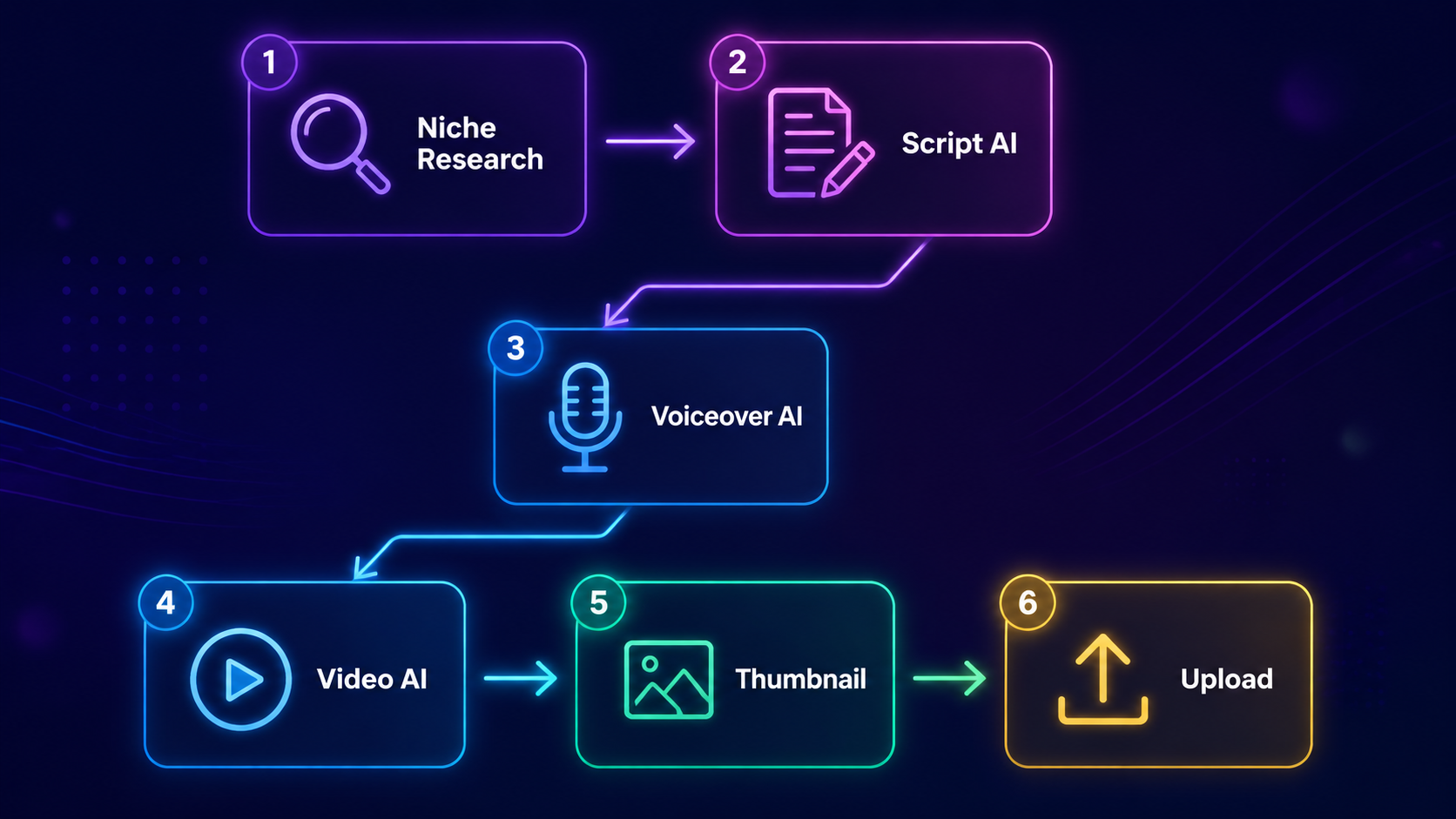
Step 1: Niche and Keyword Research
Start with YouTube Keyword Generator to find low-competition search terms in your niche. Pair it with Google Trends (free) to validate that interest is stable or growing. Use YouTube Video Idea Generator to turn those keywords into specific video concepts.
Don't skip this step. Keyword research is where most automation channels fail. Choosing topics nobody searches for means your content never gets found, no matter how well it's produced. Spend 30 minutes per week here. It's the highest-return part of the workflow.
Step 2: Scripting
Use ChatGPT's free tier for a first draft, then refine it with YouTube Script Generator for proper structure. The how to write a YouTube script guide covers this process in depth.
The most common mistake here is accepting AI output without editing. Read every script aloud before recording. If a sentence sounds unnatural spoken, rewrite it. Your watch time depends on it.
Step 3: Titles
Use YouTube Title Generator to generate 5-10 title options for each video. Pick the one that's most specific and directly answers what the viewer wants to know. Vague titles don't rank. Specific titles do.
Step 4: Voiceover
ElevenLabs' free tier gives you 10,000 characters per month. That's roughly two to three 7-minute videos at typical script length. Murf's free tier offers a smaller allowance but different voice options. For most beginners, ElevenLabs' free tier is the better starting point.
If you're running a curated commentary channel (type 4 above), record your own voice using your phone or a budget USB mic. The audio quality difference between a $0 phone recording and a $50 USB mic is real, but either beats a poorly-generated AI voice for watch time.
Step 5: Video Assembly
CapCut's free desktop version handles most automation channel needs: stock footage overlays, text animations, auto-captions, and basic transitions. DaVinci Resolve (free, no watermark) is the better choice if your videos use complex editing.
For AI narration channels, CapCut's "text to video" feature can generate B-roll from your script. In our testing, results are usable for about 60-70% of clips. The rest you'll swap for stock footage from Pexels or Pixabay (both free, no attribution required).
Step 6: Thumbnails
Canva's free tier covers every thumbnail format YouTube recommends. Use a consistent visual style across all thumbnails. Viewers recognize your channel before they read the title. That recognition builds click-through rate over time.
Step 7: Metadata Optimization
This step gets skipped most often. Don't skip it. Use YouTube Description Generator to create keyword-rich descriptions, then YouTube Tag Generator for your tag set. Before uploading, run YouTube SEO Score Checker to confirm your metadata is complete and optimized.
The how to use YouTube tags post and the YouTube SEO checklist for beginners are worth bookmarking as reference for this step.
Free Tool Stack at a Glance
| Tool Category | Free Tool | What It Does | Free Tier Limit |
|---|---|---|---|
| Keyword Research | YouTube Keyword Generator | Find low-competition keywords | Unlimited |
| Video Ideas | YouTube Video Idea Generator | Generate topic ideas from keywords | Unlimited |
| Scripting | ChatGPT (free tier) + YouTube Script Generator | Draft and structure scripts | Limited daily usage |
| Titles | YouTube Title Generator | Generate click-worthy title options | Unlimited |
| Voiceover | ElevenLabs | Text-to-speech AI voiceover | 10,000 chars/month |
| Video Assembly | CapCut (free) | Edit footage, add captions, B-roll | No watermark, unlimited |
| Thumbnails | Canva (free) | Design thumbnails with templates | Unlimited |
| Description | YouTube Description Generator | Keyword-rich video descriptions | Unlimited |
| Tags | YouTube Tag Generator | Build complete tag sets | Unlimited |
| SEO Check | YouTube SEO Score Checker | Score metadata before upload | Unlimited |
[ORIGINAL DATA] Every CreatorsToolHub tool listed above is free with no account required and no usage cap, making this one of the only complete free stacks documented in a single workflow.
How Long Does It Take to Make Money with YouTube Automation?
RPM (revenue per thousand views) varies significantly by niche. Finance channels earn $12-$25 RPM, B2B SaaS $15-$30, health $4-$10, tech reviews $4-$9, and gaming $1-$3 (TubeBuddy, 2025). The niche you choose has more impact on earnings than almost any other decision.
Here's the math at different RPM levels. These numbers assume you've cleared the 1,000 subscriber and 4,000 watch-hour threshold to qualify for monetization.
| Monthly Views | $2 RPM (Gaming) | $5 RPM (Tech) | $12 RPM (Finance) | $20 RPM (B2B) |
|---|---|---|---|---|
| 25,000 | $50 | $125 | $300 | $500 |
| 50,000 | $100 | $250 | $600 | $1,000 |
| 100,000 | $200 | $500 | $1,200 | $2,000 |
| 250,000 | $500 | $1,250 | $3,000 | $5,000 |
The math is straightforward. Reaching $500/month at a $5 RPM requires 100,000 views per month. At $12 RPM, the same $500 requires only 42,000 monthly views. This is why niche selection isn't just a creative choice. It's a financial one.
Realistic Timeline for New Automation Channels
Most channels posting twice per week take 6-18 months to reach 1,000 subscribers. That's the honest range. Channels in competitive niches (general motivation, general finance) trend toward 18 months. Channels targeting specific low-competition keywords can hit the threshold faster, sometimes in 4-6 months.
The 500 hours of video uploaded to YouTube every minute (YouTube, official platform statistics) tells you how crowded the platform is. Niche specificity and keyword targeting aren't optional for new channels. They're the only reliable way through the noise.
[UNIQUE INSIGHT] Most income calculators for YouTube automation assume linear growth. That's not how YouTube channels actually grow. Most channels see slow growth for months, then a single video catches traction and pulls up the subscriber count significantly. Plan for a long plateau, then a spike. Consistency through the plateau is what most creators quit before reaching.
YouTube Shorts Automation: Is It Worth It?
YouTube Shorts RPM sits at $0.01-$0.07 per 1,000 views for most creators (Mediacube, 2026). At that rate, you'd need 10 million monthly Shorts views to earn $700. That's a volume game most automation channels can't sustain.
Shorts still serve a purpose in an automation strategy, but not as the primary revenue source. Use them as a discovery channel. A 60-second clip from a long-form video costs almost nothing to produce once the long-form video is done. If a Short finds traction, it feeds subscribers back to your main channel.
The practical recommendation: don't build your automation strategy around Shorts. Build it around long-form videos in high-RPM niches. Use Shorts as a lightweight repurposing layer, not the core product.
Where Shorts do produce measurable results is subscriber crossover. A Short that pulls 200,000 views can add 300-500 subscribers to your main channel in 48 hours. That crossover effect is real, but it's unpredictable. You can't plan a monetization strategy around it.
The automation workflow for Shorts is simple: clip 60 seconds from your best long-form video, add auto-captions, and upload. It takes 15 minutes per Short. At that time cost, it makes sense as a distribution add-on. It doesn't make sense as the primary strategy.
The YouTube AI Policy Update: What You Must Know Before Starting
YouTube's July 2025 AI content update affects every automation channel, regardless of how carefully it's built. The core rule is simple: disclose AI use, and don't produce content that looks mass-produced.
The disclosure requirement covers three content types. Any video using a realistic AI-generated voice must be labeled. Any video featuring an AI-generated or altered human likeness must be labeled. Any video where AI has substantially altered real-world events or people must be labeled. The label appears as a notice to viewers on the video player. It doesn't affect rankings or revenue directly.
The harder rule is the "repetitive, low-effort" standard. YouTube hasn't published a precise definition, but enforcement patterns suggest three red flags: identical video structure across all uploads, no original analysis or editorial point of view, and sudden high-volume upload spikes. If your channel uploads 30 videos in a week and they all follow the same template, expect a review.
The practical takeaway is to treat the AI tools as production assistants, not content creators. You decide the angle. You review and edit the script. You add a sentence or two of genuine perspective. That's the difference between a channel that gets monetized and one that gets flagged.
How to Build Your Automation Workflow Step by Step
[PERSONAL EXPERIENCE] From what we've seen across channels using this approach, the difference between channels that reach monetization and those that don't usually comes down to workflow consistency, not tool choice. Here's a sustainable weekly system with honest time estimates.
The full system runs on roughly 8-12 hours per week for two videos. Before AI tools, the same output required 20-30 hours. That's the actual time saving.
Weekly Workflow
1. Keyword Research - 30 minutes per week
Open the YouTube Keyword Generator and run 8-10 searches around your niche topic areas. Shortlist 2-3 topics with clear search demand and manageable competition. Log them in a spreadsheet with estimated difficulty and search volume.
2. Batch Scripting - 2 to 3 hours per week
Write both scripts in one session. Use ChatGPT for a first draft, then edit for voice and accuracy. Run the output through the YouTube Script Generator to check structure. Reading aloud is non-negotiable here. If you stumble, rewrite.
3. Voiceover Generation or Recording - 1 hour per video
Paste your final script into ElevenLabs (or record yourself). Listen to the full output. Regenerate any lines that sound awkward. Most creators find one or two regenerations per video is typical. Save the audio file and move on.
4. Video Assembly - 1 to 2 hours per video
Import audio into CapCut. Add B-roll footage from Pexels or use CapCut's AI B-roll suggestions. Add auto-captions (required for accessibility and watch time). Export at 1080p minimum.
5. Metadata Optimization - 20 minutes per video
This is where most creators rush and lose rankings. Use the YouTube Description Generator for a full description draft. Use the YouTube Tag Generator for 10-15 relevant tags. Run the YouTube SEO Score Checker before you upload. Fix anything it flags.
6. Schedule and Publish
Upload to YouTube Studio and schedule the video 24-48 hours ahead. Don't publish immediately after finishing. A scheduled publish gives you time to review the final thumbnail and title with fresh eyes.
Frequently Asked Questions
What is YouTube automation with AI and is it legal?
YouTube automation with AI means using AI tools to handle parts of the content creation process (scripting, voiceover, video assembly) while a human maintains editorial oversight. It's legal and within YouTube's terms of service when done this way. Fully automated channels with no human oversight violate YouTube's policies and risk termination.
Can you start a YouTube automation channel for free?
Yes. The complete stack, including keyword research, scripting, voiceover, video editing, thumbnail design, and metadata optimization, can be built entirely on free tiers. ElevenLabs (10,000 chars/month), CapCut (free, no watermark), Canva (free), and ChatGPT (free tier) cover the core production needs. CreatorsToolHub's SEO and content tools are free with no account required.
How long does it take to make money with YouTube automation?
Most channels posting twice weekly reach the 1,000 subscriber threshold in 6-18 months, depending on niche competition and keyword targeting. Once monetized, income at $5 RPM requires approximately 100,000 monthly views to reach $500/month. Finance and B2B niches reach that income level at lower view counts due to higher RPM ($12-$30).
What's the difference between YouTube automation and a faceless channel?
A faceless channel simply means the creator doesn't appear on camera. YouTube automation refers to the process of using AI tools to systematically produce content at scale. Most automation channels are also faceless, but not all faceless channels use automation. You can run a fully automated workflow while still appearing on camera, or a fully faceless channel without any automation tools.
Which YouTube automation niches make the most money?
Finance and B2B SaaS channels earn the highest AdSense RPM ($12-$30 per 1,000 views), followed by health and wellness ($4-$10) and tech reviews ($4-$9), per TubeBuddy 2025 data. Gaming channels have the lowest RPM ($1-$3) but can compensate with high volume. For automation channels specifically, finance, personal development, and B2B education offer the best income-to-effort ratio.
About the Author
Immanuels is the creator behind CreatorsToolHub, a free AI tools platform built for content creators on YouTube, TikTok, and Instagram. He writes about YouTube growth strategy, content creation workflows, and AI tools for creators at every level.
Start Building the System, Not Just the Next Video
The bottleneck in most YouTube automation channels isn't the tools. Free tools are good enough to produce monetizable content right now. The bottleneck is consistency, specifically, showing up every week to do the keyword research, write the scripts, and optimize the metadata when it's not exciting yet.
Build the workflow first. Run it for 90 days before evaluating results. Most creators quit in the first 60 days, which is almost always before the algorithm has had enough data to start distributing their videos.
For a broader look at tools available to you, the free AI tools for beginner content creators guide and the free content creation tool stack post are good next reads. And if you want the detailed walkthrough for producing a single video from scratch, the how to start a faceless YouTube channel with AI guide picks up where this one ends.