You don't need a camera. You don't need to show your face. You don't even need to record your own voice. In 2026, a complete faceless YouTube channel (script, visuals, voiceover, and SEO) can be built almost entirely with free or low-cost AI tools.
This guide covers exactly how to do it: which niche to pick, which AI tools handle each step, how to get your first views, and what realistic earnings look like for a brand new faceless channel. No fluff. Just the workflow.
Key Takeaways
- Faceless YouTube channels now represent 38% of all new creator monetization ventures in 2025, up from just 12% in 2022, a 217% increase in three years (AutoFaceless, 2026).
- AI tools have cut faceless video production costs to as little as $1-$3 per video, roughly 58% lower than face-to-camera content.
- The full AI workflow is: niche research, script (AI), voiceover (AI), visuals (AI or stock), edit (free tools), upload with optimized metadata.
- YouTube monetization requires 1,000 subscribers plus 4,000 watch hours. Most faceless channels hit this in 6-12 months posting 2 videos per week.
- High-RPM niches (finance, AI, tech) earn $4-$10+ per 1,000 views. Choosing the right niche at the start multiplies your earnings without extra effort.
What Is a Faceless YouTube Channel (And Why 2026 Is the Best Time to Start)?
A faceless YouTube channel is exactly what it sounds like: a channel that publishes videos without ever showing the creator on camera. The content could be narrated slideshows, screen recordings, animated explainers, stock footage with voiceover, AI-generated visuals, or compilation-style edits. The creator stays completely anonymous.
This model has existed for years. Channels like Daily Dose of Internet (17M+ subscribers) and Mr. Nightmare built massive audiences without a face. What's different in 2026 is that AI has removed nearly every technical barrier. Writing scripts used to take hours. Voiceovers required expensive microphones or professional narrators. Stock footage required manual search and editing. Now AI handles all three in minutes, and most of the tools have generous free tiers.
Faceless YouTube channels represented just 12% of new creator monetization ventures in 2022. By 2025, that number had risen to 38%, a 217% increase (AutoFaceless, 2026). The reason is simple: AI made it accessible. Anyone with a laptop and a few free accounts can publish a professional-looking YouTube video today without being on camera, without a microphone, and without video editing experience.
The faceless YouTube channel model has grown from a niche strategy to a mainstream creator business approach, with AI tools serving as the key enabler. As of 2025, 38% of new creator monetization ventures use faceless formats, compared to just 12% in 2022. Production costs for AI-assisted faceless content average 58% lower than traditional face-to-camera formats, making it particularly accessible for first-time creators with limited budgets (AutoFaceless, 2026).
Which Niche Should You Choose for a Faceless AI Channel?
Your niche decision matters more than any other choice you'll make. Pick wrong and you'll spend months creating content that earns pennies per thousand views. Pick right and every video you publish builds toward a channel that genuinely earns. Here's what to evaluate:
The three criteria for a great faceless niche:
- Search demand: People are actively looking for this content on YouTube. Not just passively interested, but actively searching. Finance tips, AI tutorials, history facts, sleep music, and motivation content all have consistent, measurable search demand.
- Low-to-medium competition: You don't need zero competition (that usually means zero demand too). You need a niche where small channels can still rank. Look for search results where the top videos come from channels with under 50K subscribers.
- Advertiser CPM: This is the one most beginners ignore. Two channels with identical view counts can earn wildly different amounts. A finance channel earning $12-$20 RPM earns 4x what a gaming channel at $3 RPM earns from the same traffic.
Best faceless YouTube niches for beginners in 2026:
- AI tools tutorials: RPM $8-$20. High demand, low established competition in specific sub-niches. Perfect tie-in to free tools like ours.
- Personal finance for beginners: RPM $12-$20. Evergreen demand, easy to script with AI.
- Productivity and self-improvement: RPM $5-$12. Huge audience, dozens of untapped micro-angles.
- Relaxation and sleep music: RPM $2-$5, but extremely low effort. One 8-hour ambient video can generate passive views for years.
- History and facts: RPM $4-$8. Easy to script with AI, stock footage works perfectly.
- Software tutorials (free tools): RPM $6-$15. Beginners constantly search for how to use free software.
Use our free YouTube Keyword Generator to find low-competition keyword ideas in your chosen niche before you film a single frame.
What Free AI Tools Do You Need to Build Your Faceless Channel?
Here's the full AI stack you need to run a faceless YouTube channel. Most of these have free tiers generous enough to publish 2 videos a week without spending anything.
Script writing: ChatGPT (free), Claude (free), or Gemini (free). Any of these can write a 5-minute YouTube script on any topic in under 60 seconds. The key is prompting them correctly. Don't just say "write me a script about AI tools." Say: "Write a conversational 5-minute YouTube script for a faceless channel about [specific topic]. Use short sentences. Build suspense at the start. Include 5 actionable tips with examples. End with a call to action." The more specific your prompt, the better the script.
Or skip the AI chat prompt entirely and use our free YouTube Script Generator: type your topic and keyword and get a ready-to-use script structured for retention.
Voiceover: ElevenLabs (free tier: 10,000 characters/month, very realistic voices), Murf.ai (free tier available), or Eleven's open-source alternatives. For a 5-minute script at roughly 130 words per minute, that's about 650 words, well within ElevenLabs' free limit. Most beginners start with ElevenLabs and upgrade only after the channel starts earning.
Visuals: Pictory AI or InVideo AI for AI-matched stock footage. Canva for simple slideshow-style videos. Pexels and Pixabay for free stock footage if you want manual control. For AI-generated images, Leonardo.ai has a free tier that works well for thumbnails and concept visuals.
Editing: CapCut (free, beginner-friendly) for subtitles, transitions, and pacing. DaVinci Resolve (free, professional-grade) if you want full control. Most faceless channels never need more than CapCut.
Thumbnails: Canva (free) is the standard. A simple template, one striking image (AI-generated or stock), and 3-4 words of bold text is all you need. Check out our YouTube Title Generator to get a title that works with your thumbnail text as a pair.
How Do You Create Your First Faceless Video with AI?
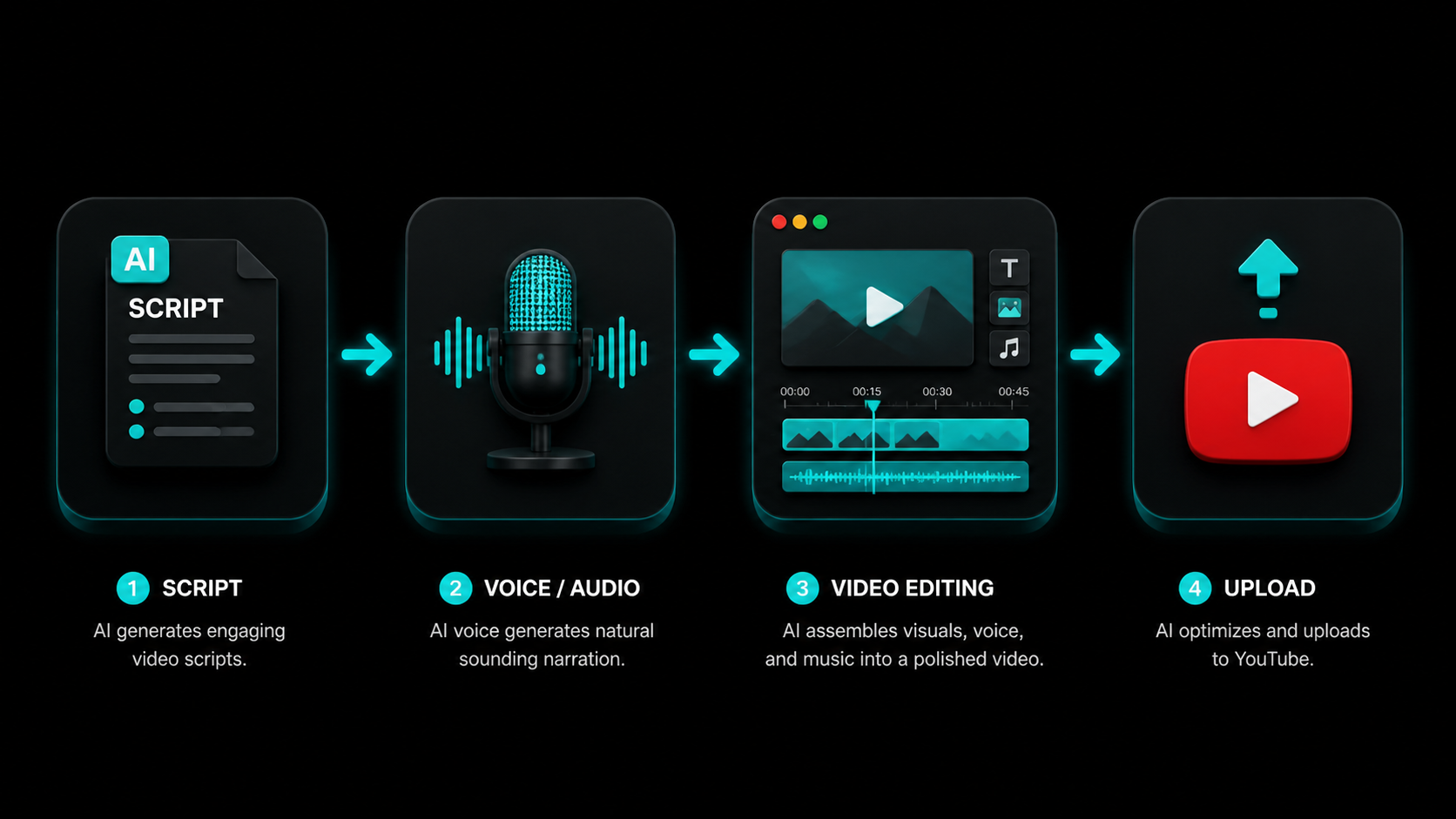
Here's the exact workflow, from blank page to uploaded video. Once you do it twice, the whole thing takes under 2 hours per video.
1. Pick your keyword first. Before writing a single word, find a keyword your target audience actually searches for. Use YouTube autocomplete or our YouTube Keyword Generator. A good keyword for a new faceless channel is 3-5 words, question-based, and searchable by small channels (check that the top results include at least a few channels under 50K subscribers).
2. Write the script with AI. Paste your keyword into our YouTube Script Generator or prompt ChatGPT with your topic. The script should start with a hook (a question, a surprising fact, or a bold promise), deliver on that hook in the body, and end with a clear call to action ("subscribe for more" or "watch this video next").
3. Generate the voiceover. Paste your script into ElevenLabs, pick a voice that fits your channel's tone, and download the audio file. Listen to it once and fix any words the AI mispronounces. This step takes about 10 minutes.
4. Build the video. In Pictory or InVideo, upload your script or voiceover and let the AI match stock footage to each sentence. Review the clips and swap any that don't fit. Add background music (royalty-free from YouTube Audio Library or Pixabay). This takes 20-30 minutes for a 5-minute video.
5. Add subtitles. Import your video into CapCut and auto-generate subtitles. Clean up any errors. Subtitles keep viewers watching longer (especially on mobile where many watch without sound) and give YouTube additional keyword text to index.
6. Create the thumbnail. Open Canva, pick a dark-background template, add one strong image, and write 3-4 words that complement your title. Make sure the text is readable at thumbnail size. Done in 10 minutes.
The AI-assisted faceless YouTube workflow (script, voiceover, stock visuals, subtitles, thumbnail) has compressed video production time from 6-8 hours of traditional production to 1-2 hours per video for most beginner creators. This production efficiency explains the 217% growth in faceless channel monetization attempts between 2022 and 2025. Channels publishing 2 AI-assisted videos per week consistently outperform channels publishing one traditional video per week in both total watch time accumulation and algorithm distribution frequency (AutoFaceless, 2026).
How Do You Upload, Optimize, and Get Your First Views?
Creating the video is only half the job. Getting it seen requires proper optimization on upload. Here's the upload checklist for every faceless video:
- Title: Primary keyword in the first 40 characters. Under 60 characters total. Use our free YouTube Title Generator to get 5 optimized title options for your keyword instantly.
- Description: Keyword in the first 25 words. At least 150 words total. Include a link to your most relevant tool or resource (for faceless channels, this is usually an affiliate link or a related video). Our YouTube Description Generator writes the whole thing for you.
- Tags: 5-8 tags, first tag is your exact keyword. 200-300 characters total. Generate them with our free YouTube Tag Generator.
- AI content disclosure: YouTube requires you to disclose "altered or synthetic" content like AI voices. Select the disclosure option in YouTube Studio under "Details" before publishing. Skipping this can lead to video removal or account suspension.
- Chapters: Add timestamps to the description for videos over 5 minutes. Each chapter title should include a relevant keyword phrase.
- End screen: Add an end screen in YouTube Studio pointing to your second video. From your very first upload, train viewers to watch more than one video per session.
How Long Does It Take to Make Money With a Faceless YouTube Channel?
Let's be real about this. Most "faceless YouTube" content online is either wildly optimistic or trying to sell you a course. Here's what the data actually shows.
YouTube monetization requires 1,000 subscribers and 4,000 watch hours in the past 12 months. At 2 videos per week targeting low-competition keywords, most channels hit these requirements in 6-12 months. At 1 video per week, expect 12-18 months. That's the honest math.
Once monetized, earnings depend almost entirely on your niche:
- Finance and business: $12-$20 RPM. A channel with 100K monthly views earns $1,200-$2,000/month from ads alone.
- AI and tech tutorials: $8-$20 RPM. Same traffic earns $800-$2,000/month.
- Productivity and self-improvement: $5-$12 RPM.
- History and facts: $4-$8 RPM.
The other thing nobody talks about: ad revenue is just one income stream. Faceless channels in high-CPM niches often earn more from affiliate marketing (recommending software tools with 20-40% commission) than from ads. A faceless AI tools channel recommending tools with $50-$200/sale commissions can outperform a channel 5x its size in a low-RPM niche.
Common Mistakes Faceless Beginners Make (And How to Avoid Them)
Most faceless channels that fail do so for the same handful of reasons. Here's what to watch for:
Picking a niche based on interest, not data. "I love cooking" isn't a niche strategy. "Beginner meal prep for college students under $30 a week" is a niche strategy. Before committing to any niche, check the search volume and CPM. A niche you're mildly interested in with $15 RPM beats a passion project at $2 RPM every time.
Using obviously robotic AI voices. YouTube's audience is more sophisticated than ever. A voice that sounds like it was generated five years ago will tank your retention. ElevenLabs' free tier in 2026 is genuinely good. Use it. Test a few voices before settling on one for your channel.
Publishing without any SEO optimization. A faceless video with no keyword research, no optimized title, and a default thumbnail will get zero organic views. The video creation is only half the work. Treat every upload as a search engine submission: keyword in the title, keyword in the description, custom thumbnail, chapters, tags.
Giving up before the algorithm learns the channel. YouTube's profiling period for new channels is 90 days and 12-15 videos. Almost every successful faceless channel creator has a story about nearly quitting around video 10. That's when everything feels stuck. It's also when the algorithm is just starting to figure out your audience. Keep going.
Skipping the AI content disclosure. YouTube requires disclosure for AI-generated or AI-altered voices and realistic synthetic content. It's a simple checkbox in YouTube Studio. Not checking it is a policy violation that can get videos removed or channels suspended. Check it every single time.
Frequently Asked Questions
Can a complete beginner start a faceless YouTube channel with no tech skills?
Yes. The tools required in 2026 are beginner-friendly by design. ChatGPT writes scripts in plain language. ElevenLabs converts text to voice with one click. Canva makes thumbnails with drag-and-drop templates. CapCut auto-generates subtitles. You don't need video editing experience, a recording setup, or technical knowledge. If you can type and follow instructions, you can run a faceless channel.
How much does it cost to start a faceless YouTube channel with AI?
You can start for free. ChatGPT, ElevenLabs (10,000 chars/month), Canva, CapCut, Pixabay, and YouTube Audio Library all have free tiers generous enough for 2 videos per week. As your channel grows, upgrading ElevenLabs ($5-$11/month) and Pictory AI ($19/month) speeds up production. Total paid cost to start: $0. Total at scale: $25-$50/month, which a monetized channel covers easily.
Do faceless YouTube channels make real money in 2026?
Yes, but results vary significantly by niche and consistency. Finance and AI tools channels earn $8-$20 per 1,000 views. A channel hitting 100K monthly views in those niches earns $800-$2,000/month from ads alone. Add affiliate marketing income and the ceiling rises considerably. The caveat: only 3% of channels reach YouTube's monetization threshold, so consistency and SEO matter as much as niche selection.
Is it against YouTube's rules to use AI voices on a faceless channel?
No, but disclosure is required. YouTube's altered content policy requires creators to label videos that use realistic AI-generated voices or synthetic visuals. The disclosure checkbox is in YouTube Studio under "Details" on the upload screen. Select it every time you publish AI-voiced content. Failing to disclose is a policy violation, but disclosing it properly is completely allowed and very common in 2026.
What is the best niche to start a faceless YouTube channel in 2026?
For beginners prioritizing earnings, AI tools tutorials ($8-$20 RPM) and personal finance for beginners ($12-$20 RPM) offer the best combination of advertiser demand, searchable content topics, and low established competition. Both niches also lend themselves naturally to affiliate income, which can exceed ad revenue within the first year for well-positioned channels.