Short answer: yes, YouTube tags still help in 2026. But probably not in the way you think. Most beginner YouTubers obsess over tags while ignoring the signals that actually drive 90% of their discoverability. A Briggsby analysis of 3.1 million data points across 100,000 videos found that only one in three top-ranking videos even use their exact target keyword in their tags (Briggsby, 2024). Tags matter, but they're a finishing touch, not a foundation. This guide tells you exactly where they fit, how many to use, and what to write.
The Bottom Line
- YouTube tags are a low-weight ranking signal. Title, thumbnail, and watch time do the heavy lifting first (YouTube Creator Academy, 2025)
- Briggsby's study of 100,000 videos found the sweet spot is 200-300 tag characters using 2-3 word phrases (Briggsby, 2024)
- Tags provide the biggest ranking boost in a video's first 3 months, before YouTube builds enough behavioral data to classify it independently
- YouTube hashtags and YouTube tags are two different things. Both matter. Neither replaces the other.
- Your first tag should always be your exact target keyword. Everything else supports it.

Do YouTube Tags Actually Help You Get More Views?
Yes, but their impact is smaller and more specific than most people expect. YouTube's own Creator Liaison has confirmed publicly that tags are a "very low weight" ranking signal compared to titles, descriptions, and viewer behavior. That doesn't mean zero. It means tags work best as a supporting layer, not the main event. According to Briggsby's large-scale study, tags provide a measurable ranking boost during a video's first three months of life, before YouTube has enough watch-time data to classify the content on its own (Briggsby, 2024). For a brand-new channel with no algorithmic history, that early boost is worth capturing.
Where tags genuinely earn their keep: covering alternate spellings and abbreviations your audience types but you'd never naturally write in a title ("gonna" vs "going to", "yt" vs "YouTube", "vlog" vs "video blog"). Helping YouTube categorize a video about a niche topic where the title alone doesn't give enough context. And giving your video a slight edge in the "Up Next" suggested column when it shares tags with popular videos on the same topic.
Where tags don't help at all: compensating for a weak title, getting a bad video recommended, or ranking above established channels purely through tag optimization. If your thumbnail doesn't get clicks and your video doesn't get watched, no tag configuration saves you. Fix those first.
How Many YouTube Tags Should You Actually Use?
YouTube allows up to 500 characters total for tags, and there's no limit on the number as long as you stay under that cap. But more tags don't mean more reach. Briggsby's data found the performance sweet spot sits between 200 and 300 characters of tags, using phrases of 2 to 3 words each (Briggsby, 2024). Cramming all 500 characters with loosely related terms doesn't expand your reach. It dilutes your signal and can trigger YouTube's spam filters.
In practice, that works out to roughly 8 to 12 tags for most videos. Enough to cover your primary keyword, several related variations, a couple of broader category terms, and your channel name. Not so many that YouTube can't figure out what your video is actually about.
One rule that holds consistently across every credible source: your first tag carries the most weight. It should always be your exact target keyword, the precise phrase you're trying to rank for. Get that right, and the rest of the tags are just supporting context.
How to Structure Your Tags So They Actually Work
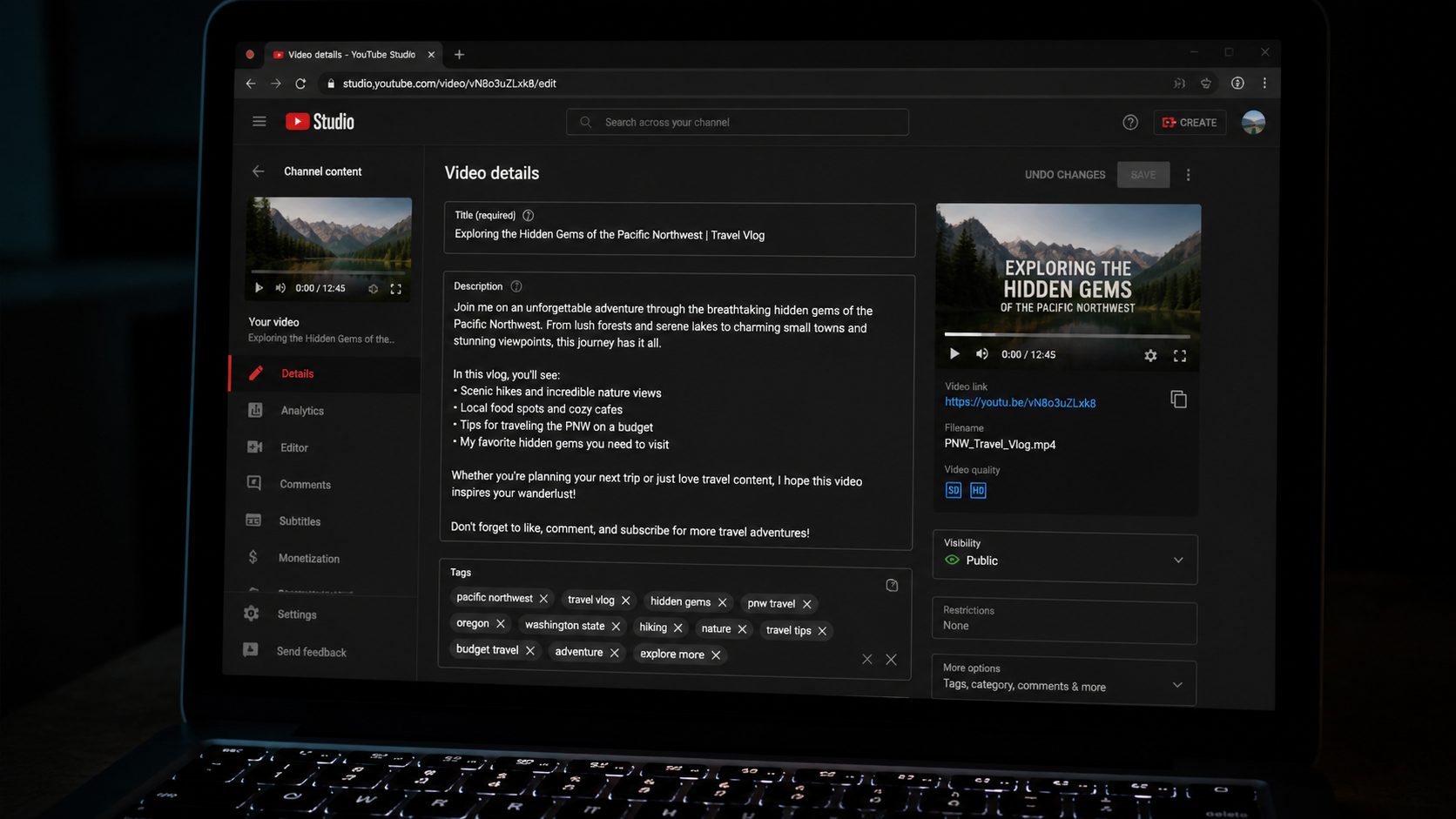
Good tags aren't random keywords thrown at a wall. They follow a structure that moves from most specific to most general. Your first tag is your exact keyword. Your next three or four tags are close variations of that keyword and related searches your audience types. Your next two or three tags are broader topic terms. Your last tag is your channel name or series name for internal linking across your content.
Here's what that looks like for a video titled "How to Film YouTube Videos on Your Phone":
- Exact keyword: how to film youtube videos on your phone
- Variations: youtube videos with smartphone, phone camera youtube setup, filming youtube on iphone
- Broader terms: youtube for beginners, youtube video tips
- Channel tag: your channel name
Notice what's not in that list: generic tags like "viral", "trending", "youtube", or "2026". Those are so broad they give YouTube zero useful information. And misleading tags (using a competitor's name, an unrelated trending topic) actively hurt your reach. YouTube's algorithm detects content-tag mismatches and can suppress distribution when it finds them (YouTube Help, 2025).
YouTube Tags vs Hashtags: Two Different Things That Both Matter
This is one of the most common points of confusion for beginner creators, and it's worth clearing up clearly. YouTube tags and YouTube hashtags are completely separate features that serve different purposes. Tags are hidden metadata you add in YouTube Studio's video details panel. Viewers can't see them. Only YouTube's algorithm reads them. Hashtags, on the other hand, appear visibly above your video title or in your description, and they're clickable links that take viewers to a hashtag feed of related content.
Tags help YouTube understand and categorize your video behind the scenes. Hashtags help viewers discover your video through hashtag browsing and add your content to topic feeds. Both are worth using. Neither replaces the other. YouTube allows up to 15 hashtags per video, though 3 to 5 highly relevant ones outperform a stuffed list every time (YouTube Help, 2025).
For a small channel, hashtags can actually drive more visible discovery in the short term because they put your video into browsable topic feeds immediately. Tags work more quietly in the background, improving search ranking and suggested video placement over weeks and months. Use both. It takes 30 extra seconds and covers both discovery pathways.
How to Find the Right Tags for Any YouTube Video
You don't need a paid tool to find good tags. Start with YouTube's own search autocomplete. Type your video topic into the YouTube search bar and look at every autocomplete suggestion. Each one is a real phrase real people are searching for right now. Those are your tag candidates. The more specific the autocomplete suggestion, the lower the competition and the better the tag.
Next, look at what tags top-performing videos in your niche are using. YouTube stopped showing tags publicly in the video page years ago, but you can still see them by right-clicking any YouTube page, clicking "View Page Source," and searching for "keywords." Every tag that video uses appears there. Study the top 3 results for your target keyword and look for patterns in their tag choices.
Then cross-reference with what your title and description already contain. Don't repeat the exact same phrases you've already used. Tags should add new information, covering variations, abbreviations, and related terms that aren't naturally in your other metadata.
The Free YouTube Tag Generator That Does This in One Click
If you'd rather skip the manual process, the free YouTube Tag Generator here at CreatorsToolHub builds a complete, structured tag set for any video topic in seconds. Paste your video title or main keyword, and it returns a full set of tags organized by type: exact keyword, variations, broader topics, and category terms. No account needed. No subscription. Copy the output directly into YouTube Studio.
It also pairs well with the YouTube Keyword Generator for finding the right primary keyword before you write your title, and the YouTube Description Generator for making sure your keyword appears in the first sentence of your description (which matters more than any tag). The whole metadata workflow takes under 5 minutes when you use them together.
Tags are the last step in that workflow, not the first. Get your keyword right, write a strong title, build a click-worthy thumbnail, craft a solid description, then add your tags. In that order. Every time.
Frequently Asked Questions About YouTube Tags
Do YouTube tags actually help with views in 2026?
Yes, but they're a secondary signal. Tags help YouTube categorize your video and can improve search placement, especially in the first three months after upload before the algorithm has enough behavioral data. They won't save a video with bad thumbnails or low retention, but a well-structured tag set consistently gives new videos a small, measurable discoverability edge.
How many tags should you use on YouTube?
Briggsby's analysis of 100,000 videos found the performance sweet spot is 200-300 characters of tags, which works out to roughly 8-12 tags using 2-3 word phrases. You can use up to 500 characters total, but cramming all 500 with loosely related terms doesn't increase reach. Relevance matters far more than quantity.
What should your first YouTube tag always be?
Your exact target keyword. Always. The first tag carries the most algorithmic weight, and it should match the primary phrase you're trying to rank for. If your video targets "how to film YouTube videos on your phone," that phrase should be your very first tag, written exactly as viewers would type it into search.
What's the difference between YouTube tags and YouTube hashtags?
Tags are hidden metadata in YouTube Studio that only the algorithm reads. They help categorize your video for search and suggested content. Hashtags appear visibly above your video title and are clickable links that add your video to topic browsing feeds. Both help discoverability. Use 8-12 tags in the details panel and 3-5 hashtags in your description or title. They're not interchangeable.
Can using the wrong YouTube tags hurt your channel?
Yes. Using misleading tags (competitor names, unrelated trending topics) violates YouTube's spam policies and can suppress your video's reach. YouTube's algorithm detects mismatches between a video's content and its tags. Irrelevant tags don't give you a neutral result. They actively work against you. Stick to tags that accurately describe what your video is actually about.